$59/monthΒ· 14-Day Free Trial
No credit card required Β· Cancel anytime
Works in the US, Canada, Australia, New Zealand & the UK
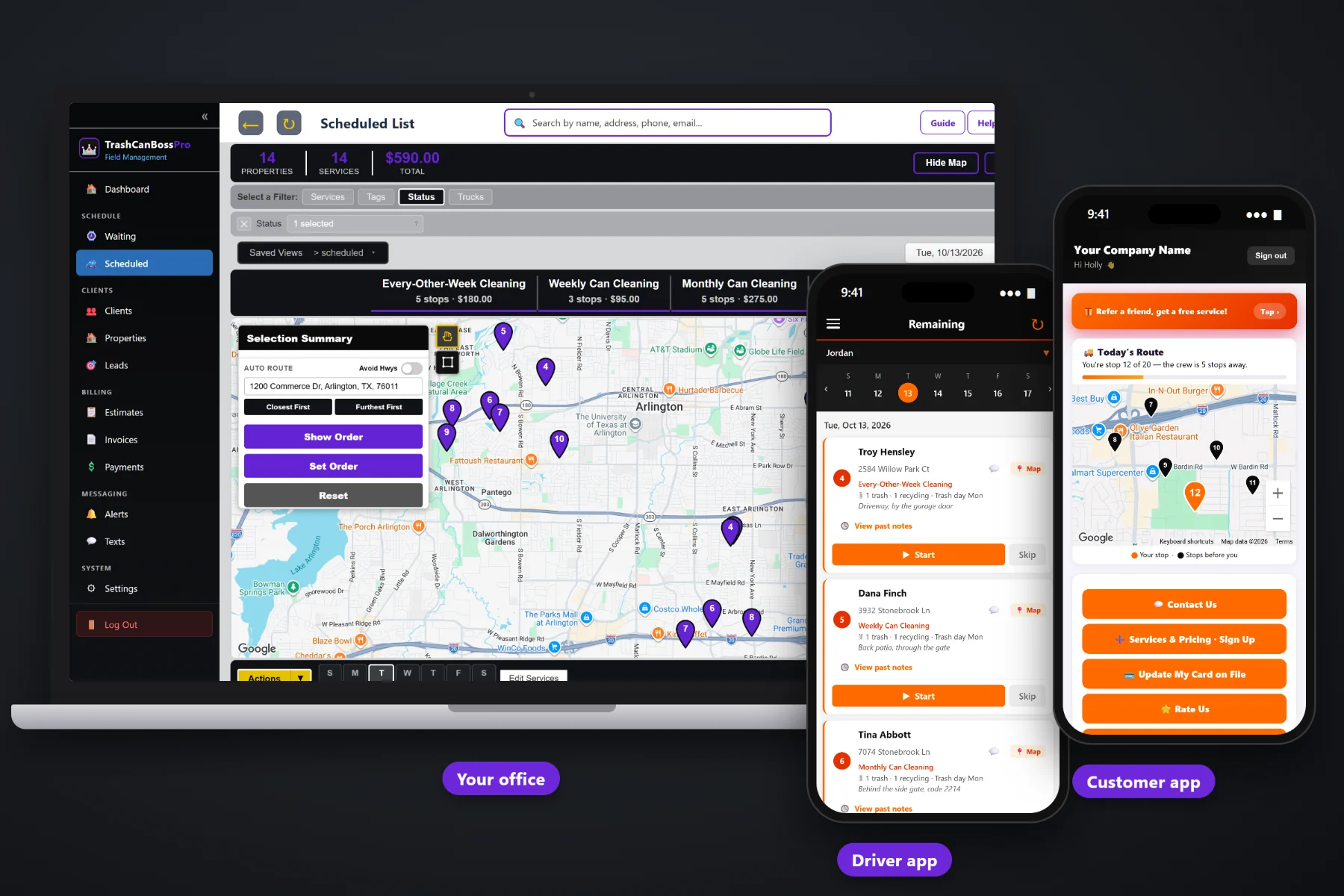
TrashCanBossPro on a laptop showing the service waiting list and dispatch map, with the tech app and the customer app on two phones
Live demo β€” go ahead, scroll & tap it
my.trashcanbosspro.com
Spinning up your live demo…

The full software you run everything from β€” weekly, every-other-week and monthly cleanings coming due on a live map, the cans and trash day on every address, the dispatch board by trailer, billing and more.

Built for Trash Can Cleaning Companies

Every Can, Every Trash Day
On One Live Map

TrashCanBossPro is scheduling, routing and billing software for trash can cleaning companies β€” weekly, every-other-week and monthly bin cleaning for homeowners, plus HOAs, apartments and commercial dumpster pads. Every address carries its cans and its city trash day, recurring plans come due on their own on a live map, you build each trailer's route around trash day in one step, every tech sees the can count and where the cans sit with one-tap navigation, the customer watches the crew on the way, and the card on file is charged when the cans are clean.

Start Your 14-Day Free Trial
No credit card required Β Β·Β  14-day free trial Β Β·Β  from $59/mo after
$59
Plans Start Per Month
14
Day Free Trial
$0
Per-User Fees
24/7
Access Anywhere

Affordable Doesn't Mean Cheap.
This Is Enterprise-Level Software.

We priced it like operators because we are operators. We know what it's like to pay for software that nickel-and-dimes you and still doesn't fit how a service company actually runs. TrashCanBossPro does what the big platforms do β€” a live dispatch map, automated texts, card payments, role-based access, a tech mobile app β€” set up for trash can cleaning and priced for a real company. Plans start at $59 a month, and you are never billed per user.

πŸ—ΊοΈ

Live Service Map & Dispatch

Every weekly, every-other-week and monthly cleaning that came due, pinned on a live map and colored by when it's due. Circle the stops or select them and assign them to a trailer in one step, with route order and auto-routing β€” standard on every plan, so you stop sending a trailer across town for two cans.

🏒

HOA & Property Manager Accounts

HOAs, property managers and businesses with cans at several addresses get ONE statement a month covering every address, each line labeled with the address β€” the one bill they ask for, without you building it by hand.

πŸ’¬

Automated Customer Texts

Night-before reminders (β€œwe clean tomorrow, leave the cans out”), β€œon the way” texts, a two-way texting inbox, quote follow-ups and payment follow-ups β€” all going out without you picking up the phone.

πŸ”

Recurring Plans That Come Due

Weekly, every-other-week and monthly plans are set by the minimum days between visits β€” 7, 14 or 28. Each address drops back onto the waiting list when it's due, and the card on file is charged when the cleaning is done.

πŸ‘‘

Role-Based Access Control

Owner, Manager, Office, Crew Lead, and Mobile roles. Your office staff see what they need. Your techs see only their jobs.

πŸ“±

Tech App for Every Trailer

Your techs see their stops in route order with the cans at each address β€” 2 trash, 1 recycling β€” where the cans sit and the gate code, navigate with one tap, take before and after photos, and mark the cleaning complete from the truck.

Circle the Stops on the Map.
Assign Them to a Trailer in One Step.

Every weekly, every-other-week and monthly cleaning lands on the Waiting List and drops a pin on a live map. Plans come due on their own, based on each plan's minimum days between visits. Draw a circle around a part of town β€” a subdivision, an HOA, a ZIP code β€” or just select the stops, and TrashCanBossPro assigns them to a trailer in one step.

When sign-ups are coming in faster than anyone can write them down, you stop juggling sticky notes and see exactly which trailer is already working that side of town on that trash day. No scribbled addresses. No trailer sent across town to wash two cans. No wasted miles.

  • Total stop count inside the circle, broken down by service
  • Weekly, Every-Other-Week, Monthly and One-Time Cleanings
  • Pins colored by status: not due yet, due now, or overdue past a 7-day grace
  • Assign all circled stops to a trailer at once β€” they drop onto the dispatch board in route order
  • Cans on every address β€” trash, recycling and yard waste β€” plus the city trash day
  • Know which trailer should take it before you dispatch. Stop wasting fuel and drive time.
Waiting List Map β€” Circle Selection
9
Stops Selected
Trailer 3
Assign To
5
Weekly Cleanings
2
Monthly Cleanings
Weekly Β· 5 Β |Β  Monthly Β· 2 Β |Β  Every-Other-Week Β· 1 Β |Β  One-Time Β· 1
Breakdown by Service
Drops to the dispatch board in route order

Give Every Customer Their Own App β€”
And You Decide What They See.

Most software this powerful stops at you and your techs. TrashCanBossPro gives your customers their own branded app they install right on their phone β€” no app store, no password, just a secure text-link login.

βœ“See where they are on today’s route on a live map β€” β€œYou’re stop 12 of 20” β€” no more β€œwhen is the truck coming?” calls
βœ“View and pay invoices right from their phone β€” card on file, one-tap Pay Now
βœ“Request a service β€” an extra cleaning, another can added to the plan, or a one-time clean β€” without calling the office
βœ“Update their card, sign up for more services, or refer a neighbor
βœ“Pick their alerts β€” the night before, when they’re next, and when the tech arrives
βœ“Rate the cleaning and see every invoice they’ve paid

You choose exactly what each customer can see β€” flip any feature on or off with a single switch.

Powerful Doesn't Have to Mean Complicated.

The big enterprise platforms take weeks to learn, months to set up, and require a dedicated person just to manage them. TrashCanBossPro is designed so any owner or dispatcher can be sending trailers out on day one β€” without training, without a consultant, without an IT department.

01

Set Up in One Afternoon

Add your services and plan pricing, import your customer list from a CSV, add your trailers and techs, set up your HOA and property manager accounts, and configure your text templates. No implementation fee. No onboarding consultant. No 6-hour kickoff call.

02

One Screen Does Everything

The dispatch board shows the cleanings coming due, your scheduled jobs by trailer, your live map, and your day summary all in one place. Your techs get their jobs on their phone. No more scribbled addresses, and no switching between six different apps to run your day.

03

Built for the Truck, Not the Desk

The tech app is built for techs, not office managers. Big buttons, clear status, the address, the cans β€” 2 trash, 1 recycling β€” and where they sit right on the job, and one tap to navigate, mark a cleaning complete, or add a note and before/after photos.

04

Automation Runs Without You

Set your alert templates once β€” night before, on the way, arrived, completed, quote follow-ups, payment follow-ups. After that, TrashCanBossPro handles customer communication on every job, every day, without you having to think about it again.

Stop Juggling 5 Different Apps

TrashCanBossPro replaces your route whiteboard, your billing software, your texting tool, and the cleaning schedule spreadsheet β€” all under one roof.

πŸ“‹

Cleaning Waiting List

Every weekly, every-other-week and monthly cleaning that came due waits on one list and on a live map, with pins colored not due yet, due now or overdue past a 7-day grace. Plans come due on their own β€” assign them to a trailer in one step instead of working from a spreadsheet.

πŸ—ΊοΈ

Dispatch Board & Auto-Route

Jobs by day on a week strip, filtered by trailer or truck. Drag stops into order or auto-route them Closest First or Furthest First from your shop, with stop and dollar totals for each service.

πŸ“…

Routes Built Around Trash Day

Every address carries its city trash pickup day. Build each day's route around it so the cans get cleaned right after the city empties them β€” not while they're still full.

πŸ—‘οΈ

Cans on Every Address

Trash, recycling and yard waste can counts on each address, plus the trash day and can location notes β€” side of the garage, behind the gate, gate code. Shown as β€œ2 trash Β· 1 recycling Β· Trash day Tue” on the lists and the tech's phone.

πŸ’°

Estimates & Invoices

Send professional quotes for homeowners, HOAs, apartments and commercial dumpster pads, let customers approve them online, and turn approved quotes straight into scheduled services. Track every dollar owed.

πŸ’³

Card-on-File Payments

Accept credit cards right through the platform. Store cards on file, charge automatically when the job is done, take online payments, and track payment history all in one place.

πŸ’¬

Two-Way SMS

Send and receive text messages from customers right inside the app. Full conversation history organized by contact β€” no more switching to your phone.

πŸ””

Automated Alerts

Auto-text and email customers the night before service, when the tech is on the way, has arrived, or has completed the job. Set it once and let TrashCanBossPro handle the communication.

πŸ‘₯

HOA & Commercial Accounts

Manage homeowners, HOAs, apartment complexes and businesses β€” an account set to Monthly gets one statement each month with every address labeled.

πŸ”‘

Can Location & Gate Notes

Where the cans sit β€” side of the garage, behind the gate β€” plus gate codes and access notes on each job, right in front of the tech, and before/after photos when the cleaning is done.

πŸ“

Clients & Addresses

Clients with more than one address keep every address under one record. Tag them Monthly, Every-Other-Week, HOA or Commercial, add custom fields, and import your customer list from a CSV.

πŸš›

Techs, Trailers & Time Clock

Manage employees and trailers or trucks, assign techs and trailers to jobs, track hours on the time clock, and control who sees what with role-based access for office staff and techs.

πŸ“Š

Dashboard & Reports

Custom stat cards show today's revenue, jobs completed, money owed, and more β€” all at a glance the moment you log in.
Built for Every Kind of Can Cleaning Job

Every job gets a service, the cans at the address, and its own place on the waiting list, so the board always says exactly what each trailer is going out to do.

πŸ”„

Weekly Cleaning

Clean cans every week, right after trash day. Set at 7 days between visits, so every address comes back due on its own.

πŸ—“οΈ

Every-Other-Week

Set at 14 days between visits, with the cans and the trash day right under the address, so the route lines up with the city pickup every time.

πŸ“†

Monthly Cleaning

Set at 28 days between visits. The address drops back onto the waiting list when it's due, and the card on file is charged when it's done.

βž•

One-Time Cleaning

A move-in, a smelly summer can, a first clean before a plan starts. The customer can request it from their app, and it lands on the waiting list.

🏘️

HOAs & Apartments

Many cans at many addresses under one account, billed on one monthly statement with each line labeled by address.

🏒

Commercial Dumpster Pads

Restaurants, offices and shops with bins and dumpster pads, on their own plan, with location and gate notes on every job.

We Got Tired of Getting Nickel-and-Dimed.
So We Fixed It.

Over the years we have tried just about every field service software out there. Every feature was an add-on. Every user cost more. Every upgrade was another invoice.

Want texting? That's an add-on. Want more users? Pay per user. Want the reporting module? Upgrade your plan. It never ended β€” and the people who built that software had never run a truck in their life.

That's why TrashCanBossPro has three simple plans β€” Start at $59, Pro at $89 and Crew at $199 a month β€” and you are never billed per user. Every plan includes dispatch, the tech app, the customer app, estimates, invoicing and card payments.

The only metered piece is texting, because texts cost us money to send and receive. Start includes 500 texts a month, Pro 1,000 and Crew 2,000 β€” sent and received β€” and if you go over, it's $15 per additional 500. No gotchas. No surprises. We're operators just like you, and we built the pricing we always wished existed.

No contracts. Cancel anytime. No hidden fees β€” ever.

Pick the size you actually are

Every plan is the same software. The bigger plans lift the limits and turn on the automation β€” you are never paying for seats you do not have.

Start
$59
per month
Owner-operator, one trailer
MOST POPULAR
Pro
$89
per month
Small fleet, fully equipped
Crew
$199
per month
Multiple trailers and routes
Users
Office logins - the people who dispatch, invoice and see the money
23Unlimited∞
Employees
Tech-app seats - they run the route and complete the cleanings, they never see the money. Unlimited on every plan.
Unlimited∞Unlimited∞Unlimited∞
Trucks / trailers
12Unlimited∞
Customers & addresses
Unlimited∞Unlimited∞Unlimited∞
Texts included (sent + received, US & Canada)
500 extra texts for $15 on any plan. Sent and received both count. A text is 160 characters; a longer one counts as two.
500 / month5001,000 / month1,0002,000 / month2,000
Smart Lasso map selections
Unlimited∞Unlimited∞Unlimited∞
Auto-routing
250 extra auto-routes for $5 on any plan, added automatically when you need them.
50 / month50100 / month1001,000 / month1,000
Cleaning waiting list, live map & dispatch
βœ“βœ“βœ“
Recurring plans that come due
βœ“βœ“βœ“
Estimates, templates & follow-ups
βœ“βœ“βœ“
Invoicing
βœ“βœ“βœ“
Card on file & customer payments
βœ“βœ“βœ“
Customer app
Your customer signs in by text β€” sees where they are on today’s route on a live map, sees invoices, pays, and sets their own alert preferences
βœ“βœ“βœ“
Tech app
Jobs in route order with one-tap navigation, the cans and trash day at each address, can location and gate notes, start, skip and complete jobs, before/after photos
βœ“βœ“βœ“
Schedule alerts
βœ“βœ“βœ“
Estimate alerts
βœ“βœ“βœ“
Receive customer replies
βœ“βœ“βœ“
HOA & commercial monthly billing
βœ“βœ“βœ“
Sales tax & reporting
βœ“βœ“βœ“
Customer CSV import & reports
βœ“βœ“βœ“
Multiple addresses per customer
HOAs, landlords and property managers with several addresses - every address saved once under the one customer
βœ“βœ“βœ“
Employee time clock & hours
βœ“βœ“βœ“
"On the way" text
Your tech sends it with one tap from the tech app
βœ“βœ“βœ“
Reply back to customers
β€”βœ“βœ“
All other automated alerts
Arrived, completed, follow-ups and the rest
β€”βœ“βœ“
Automated invoice sending
β€”βœ“βœ“
Automatic card charging
β€”βœ“βœ“

14-day free trial on every plan Β· no card to start Β· cancel anytime Β· move up or down whenever you like.
Need more? 500 extra texts for $15on any plan Β· counted sent and received, 160 characters per text.

From β€œCan You Start Us Next Week?” to On the Route in Seconds

TrashCanBossPro gives you a waiting list of every cleaning that came due, a dispatch board of the jobs by trailer and by day, and a live map of every address, so every tech knows exactly where the cans are and how many to wash.

  • Waiting list with counts by plan β€” weekly, every-other-week, monthly and one-time
  • Assign stops to a trailer in one step
  • Route order and auto-routing (Closest First or Furthest First from the shop)
  • Cans and trash day under the address on every job
  • Can location notes, gate codes and customer notes on every job
  • Filter by trailer or truck and day
  • Summary bar: total jobs, revenue, and jobs completed
  • Mark jobs complete, skipped, or rescheduled with one click
Today's Jobs β€” Trailer 1
118 Oak St β€” Torres, M.
Weekly Β· 2 trash Β· 1 recycling Β· side of the garage
Done
456 Elm Ave β€” Willow Creek HOA
Monthly Β· 2 trash Β· 1 yard waste Β· behind the gate
Done
789 Pine Rd β€” Lee, R.
Every-Other-Week Β· 1 trash Β· 1 recycling Β· gate code on job
In Progress
321 Maple Dr β€” Patel, S.
One-Time Cleaning Β· 3 trash Β· Trash day Tue
Up Next
4 Jobs Β· 1 TrailerDay Summary
2Recurring Cleanings Done
6 cans cleaned
1In Progress
2 cans
1One-Time Cleaning
1 up next

Get Paid Faster. Chase Less.

Build a quote in minutes, email it from the platform, and let the customer approve it online with a single click. When a cleaning is marked complete, the invoice is built and the card on file is charged automatically β€” or roll an HOA's addresses onto one monthly statement β€” all without leaving TrashCanBossPro.

  • Estimate builder with your service list and line items
  • Approved estimates become scheduled services
  • Invoices with line items and sales tax
  • Card-on-file auto-billing when the job is marked complete, or on a schedule
  • Email quotes with custom branded templates
  • Client-facing estimate page with Accept / Decline buttons
  • Invoice management with unpaid, partial, paid, and overdue filters
  • One monthly statement per HOA, property manager or business, each line labeled with the address
  • Past-due follow-up on unpaid invoices
  • Full payment history with method, date, and reference tracking
Invoice #0042 β€” Monthly Cleaning Complete
Line Items
Monthly Can Cleaning β€” Trash Can$20.00
Monthly Can Cleaning β€” Recycling Can$15.00
Sales Tax (8.25%)$2.89
Total$37.89
βœ“ Charge Card on File
βœ‰ Send Invoice

Communicate Like a Big Company.
Run Like a Small One.

Set up automated SMS and email alerts once. TrashCanBossPro sends them automatically β€” so customers stop calling to ask β€œare you cleaning my cans today?”

πŸ“…
Night Before
β€œWe clean tomorrow β€” leave the cans out”
πŸš›
On the Way
Sent automatically from the tech's app when they head to the address
βœ…
Tech Arrived
Tells the customer the crew is at the curb
πŸ”„
Rescheduled Alert
Instantly notify on date changes
πŸ“„
Estimate Sent
SMS when the quote hits their inbox
πŸ”
Estimate Follow-Ups
3 automated follow-ups if not accepted
πŸŽ‰
Estimate Accepted
Celebrate (and get them on the route)
⭐
When They're Next
Tells the customer they're the next stop
πŸ’³
Payment Declined
Notify and follow up automatically
πŸ’¬
Inbound Text Alert
Get notified when a customer texts you

Toggle SMS and Email independently for each alert type β€” you're in full control.

10+
Automated Alert Types
3
Estimate Follow-Up Sequences
3
Payment Follow-Up Sequences
∞
Custom SMS Templates

Office, Field, and Mobile β€” All Connected

TrashCanBossPro isn't just for the office. Your techs get an app built for the truck β€” stops in route order, one-tap navigation, the cans at each address, can location notes, before/after photos and one-tap complete. Roles control exactly what each person can see and do.

  • Role-based access: Owner, Manager, Office, Crew Lead, Mobile
  • Techs log in with a company login and personal PIN, see their stops, can counts, can location and gate notes, take before/after photos, and mark jobs complete
  • Office staff manage requests, billing, and messaging
  • Employee time clock and hours reports
  • Automatic β€œon the way” and arrival texts straight from the tech app
  • Admin controls for adding, deactivating, and managing users
Team Access Levels
πŸ‘‘
Owner
Full access β€” all features, billing, users
🏒
Manager
Dispatch, customers, accounts, reports
πŸ“‹
Office Staff
Billing, messaging, customer management
πŸ“±
Tech (Mobile)
Their jobs only β€” navigate, take photos, mark complete

Every Plan Comes Due on Its Own.

A weekly customer who gets skipped calls you. A monthly customer who gets forgotten may just cancel. TrashCanBossPro sets every plan by the minimum days between visits β€” 7 for weekly, 14 for every-other-week, 28 for monthly β€” and drops each address back onto the waiting list when it's due, with the cans and the trash day right under the address, so nobody slips through.

  • Weekly, every-other-week and monthly plans set by minimum days between visits
  • Pins colored not due yet, due now, or overdue past a 7-day grace
  • β€œ2 trash Β· 1 recycling Β· Trash day Tue” shown right on the lists
  • Build the route around trash day so cans are cleaned right after pickup
  • Card on file charged when the cleaning is completed
  • Automated payment follow-ups on what's owed
Plans Coming Due β€” This Week
14
Every-Other-Week (days)
28
Monthly (days)
6
Due Now
2
Overdue
1 trash Β· 1 recycling Β· 118 Oak St
Monthly Β· Trash day Tue Β· cleaned today, $35 charged to card
Billed
2 trash Β· 1 yard waste Β· 456 Elm Ave
Every-Other-Week Β· Trash day Thu Β· due in 2 days
Due Soon

Built by an Operator. Owned by an Operator.

We're not a big corporation. We're not a venture-backed tech startup. We're a privately owned company built by someone who has been running a field-service business since 2006.

TrashCanBossPro is part of the BossPro family of field-service software, built by an owner who has run trucks, routes and crews since 2006. We didn't have to guess what a company with trucks on the road needs β€” the waiting list, the route for every truck, the customer who wants a text before you pull in, the invoice that needs collecting. We lived it every day.

We built this software because too much of what's out there was built by people who have never run a service truck, never had the phone ringing with the next service request while the truck is still out on the route, never had to chase a payment while also dispatching the day. They build features they think you need. We build features we know you need.

TrashCanBossPro is privately owned β€” no corporate board, no outside investors, no decisions made by people who have never run a route. When you call or message us, you're talking to the owner. That's the way we like it, and that's never going to change.

Fast. Reliable. No Delays.

TrashCanBossPro runs on the latest and greatest infrastructure available today. That means your texts and emails go out in seconds β€” not hours. No queues backing up, no alerts firing late, no wondering if your customer got the message. Everything happens in real time, the way it's supposed to.

We built on a modern stack specifically to eliminate the performance issues and outages that plague older field service platforms. Less downtime. Fewer bugs. A faster experience every time you log in.

Alert Delivery
Tech On the Way SMS
Sent to customer Β· 0.4 seconds
Delivered
Estimate Email
Sent to customer Β· 0.9 seconds
Delivered
Night-Before Reminder SMS
Sent to customer Β· 0.6 seconds
Delivered
No Hours-Long Delays.
Your customers hear from you instantly β€” every time.

Everything a Trash Can Cleaning Company Runs On

Trash Can Cleaning Software
30 guides β†’
Routes by Trash Day
30 guides β†’
Recurring Plans
30 guides β†’
Tech App
30 guides β†’
Sign-Ups & Booking
30 guides β†’
Billing & Payments
30 guides β†’
HOAs & Commercial
30 guides β†’
Running a Bin Cleaning Business
30 guides β†’

Have an Idea? We'll Build It.

Most software companies put your feature request in a queue and get back to you six months later β€” if ever. That's not us. When you have a suggestion or need something built for your workflow, we listen. We respond. And we build it fast.

Custom features for our clients typically ship in 1–2 weeks, not months. TrashCanBossPro is built by someone who runs a field-service business, and we know that when you need something, you need it now β€” not on the next quarterly release cycle.

Our goal is simple: be the best trash can cleaning software available. And the only way to get there is by building it with our clients β€” not just for them.

Feature Request Timeline
πŸ’¬
You submit a request
Tell us what you need and why
Day 1
⚑
We start building
No committees. No approval queues.
Day 2–3
βœ…
Feature is live
In your account, ready to use
Week 1–2
Not months. Weeks.
Your input shapes the software you use every day.

Your Competition Is Already
Using Software Like This.

Stop running your bin cleaning company off a spreadsheet, a paper route sheet and a group text. Get every recurring cleaning on the map, build routes around trash day, send every tech to the right address with the can count and gate code, charge the card on file when the cans are clean, send HOAs one monthly bill, and give customers an answer to β€œwhen are you coming?”

Start Your 14-Day Free Trial
No credit card required Β Β·Β  14-day free trial Β Β·Β  from $59/mo after