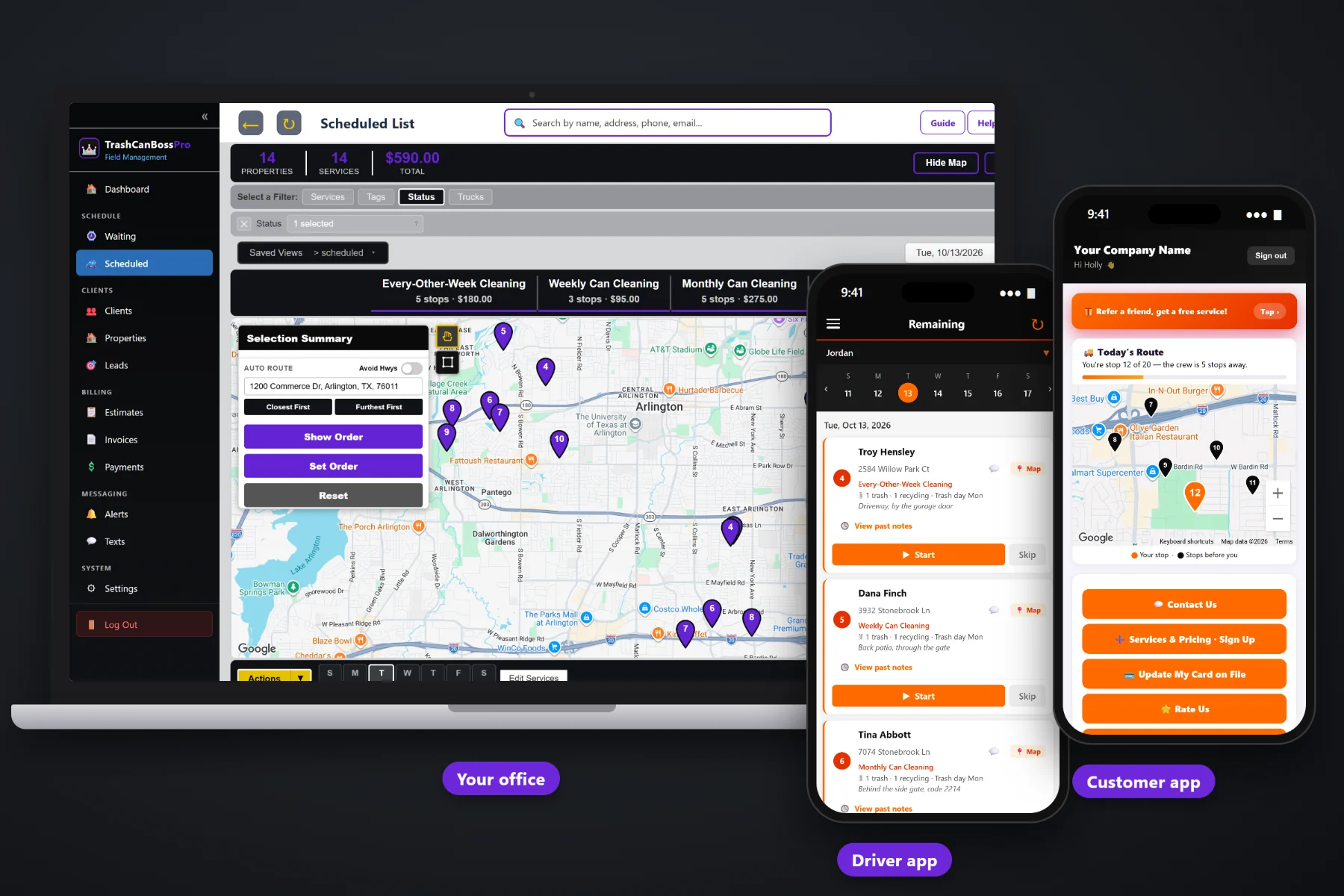
A bin cleaning route is forty small tickets a day. If each one needs a paper invoice, a reminder and a phone call, the billing eats the profit. TrashCanBossPro takes the card at sign-up, creates the invoice when the tech taps Complete, charges the card on file, and puts every invoice in the customer app where people can pay and update their own card. HOAs and property managers get one monthly statement for every address they own.
Plans start at $59/month and you are never billed per user. Invoices, card on file, auto-charge, sales tax, monthly statements and online payment are part of the platform, not an add-on you pay extra for. To see how billing fits with the Waiting List, routes around trash day, the tech app and the customer app, start at TrashCanBossPro and then come back here for the money side.
The sign-up form captures the card, so a new customer is ready to bill before the first cleaning is ever scheduled.
When the tech taps Complete, the invoice is created and the card on file can be charged. Or charge on a schedule instead.
Cans, deodorizing, pad washing and deep cleans each on their own line, with sales tax figured for you.
Accounts set to Monthly get one statement covering every address they own, each line labeled with its address.
Customers see their invoices, pay online and update their own card without calling the office.
See who owes what and follow up by text or email from the office, instead of a sticky note on the monitor.
Most billing questions come from invoices that say "Service — $45" and nothing else. TrashCanBossPro builds invoices from your own service list, so the customer sees what was cleaned, what was added and what the tax was. Fewer questions means fewer refunds and fewer phone calls on a Saturday.
Billing a bin cleaning route should not take an evening at the kitchen table. TrashCanBossPro ties the money to the work, so the invoice exists the moment the cans are clean and the card is charged without anyone opening a spreadsheet.
Your website sign-up form captures the plan, the cans and the card. One click turns the sign-up into a client.
Weekly, every-other-week and monthly plans show up on the Waiting List on their own and get routed around trash day.
The invoice is created with your line items and tax, and the card on file can be charged right then or on your schedule.
The invoice is in the customer app. Anyone with a declined card can update it and pay there themselves.
Nobody loses a bin cleaning business on one big unpaid job. They lose it on a hundred small ones: a card that expired in March, a recycling can cleaned but never billed, an HOA that wanted one bill and got forty.
Ask any owner who started with a pressure washer and a spreadsheet how billing goes. The route gets done on Tuesday. The invoices go out on Sunday night, if they go out at all. A few customers pay by check, a few forget, and nobody notices the third can was never on the bill.
When the invoice is created at the curb and the card is already on file, the money follows the work. There is nothing to remember, nothing to retype and no stack of paper to reconcile at month end.
TrashCanBossPro keeps the customer, the cans, the cleaning and the invoice in one place, from the sign-up form to the paid statement.
Every tool here exists to get each cleaning billed, paid and recorded with as little office time as possible.
Customers pick their plan and enter a card on your website. The sign-up lands in Form Responses, ready to convert.
Stored on the client so every future cleaning can be charged without asking again.
Complete creates the invoice and charges the card on file. Prefer billing on a schedule? That works too.
Built from your service list: per-can cleanings, add-ons, deep cleans and pad washes.
Deodorizing, pad washing and extra cans each show as their own line.
Tax on invoices where your area requires it.
HOAs, property managers and businesses set to Monthly get one statement for every address.
Dumpster pads and apartment can rooms billed on the same account as the rest of the properties.
Customers see invoices, pay online and update their card on their own phone.
Find unpaid invoices and follow up by text or email from the office.
An approved estimate becomes scheduled services, so the quote and the bill match.
Monthly, Every-Other-Week, HOA and Commercial tags keep billing groups easy to find.
Look back at what was billed and paid when you sit down at month end.
Works in the US, Canada, Australia, New Zealand and the UK and bills each customer in their own currency.
Bring your existing customer list over instead of retyping it.
Start $59, Pro $89 and Crew $199 per month, not a per-seat charge.
An HOA board or a property manager does not want forty separate invoices for forty houses or forty can rooms. Set the account to Monthly and TrashCanBossPro sends one statement each month, with every cleaning listed and each line labeled with its address. The manager can see exactly which properties were cleaned, and your office sends one bill instead of forty. For the whole picture of billing a bin cleaning route, read Trash Can Cleaning Billing: The Complete Guide to Getting Paid for Every Bin You Clean.
Most declined cards are not people refusing to pay. The card expired, or the bank sent a new number. In TrashCanBossPro the customer opens the customer app, updates the card and pays the open invoice, without a phone call. The same app shows today's route on a live map, lets them request a one-time deep clean, sign up for add-ons, and choose their alerts: the night before, when they're next, and when the tech arrives.
Pick the plan that fits your route. Every plan starts with a 14-day free trial and no credit card.
Compare plans on the pricing page.
You choose. The card on file can be charged when the tech taps Complete, which creates the invoice at the curb, or invoices can be charged on a schedule. Accounts set to Monthly, like HOAs and property managers, get one statement each month instead.
The sign-up form on your website captures the card along with the plan and the cans. The sign-up lands in Form Responses, and one click converts it into a client with the card already on file.
Yes. Invoices are built from your own service list, so each can, add-on, deep clean or pad wash can be its own line item. You set the prices for your own services.
The invoice stays open so you can see it. The customer can update their card in the customer app and pay the invoice there, and the office can follow up on past-due invoices by text or email.
Yes. Set the HOA, property manager or business to Monthly and they get one statement each month covering every address they own, with each line labeled with the address.
Start is $59/month, Pro is $89/month, and Crew is $199/month. You are never billed per user, and every plan starts with a 14-day free trial with no credit card.
Billing is one piece of how TrashCanBossPro runs a bin cleaning company. For recurring plans, the Waiting List, routes around trash day, the tech app and the customer app, see the full TrashCanBossPro platform overview.
Practical reading on card on file, auto-charge on completion, per-visit vs monthly billing, line items and add-ons, declined cards, past-due follow-up, sales tax, HOA statements, dumpster pads and month-end review.
Card on file at sign-up, invoices created when the cans are clean, one statement for every HOA, and payment from the customer app. Try TrashCanBossPro free for 14 days.