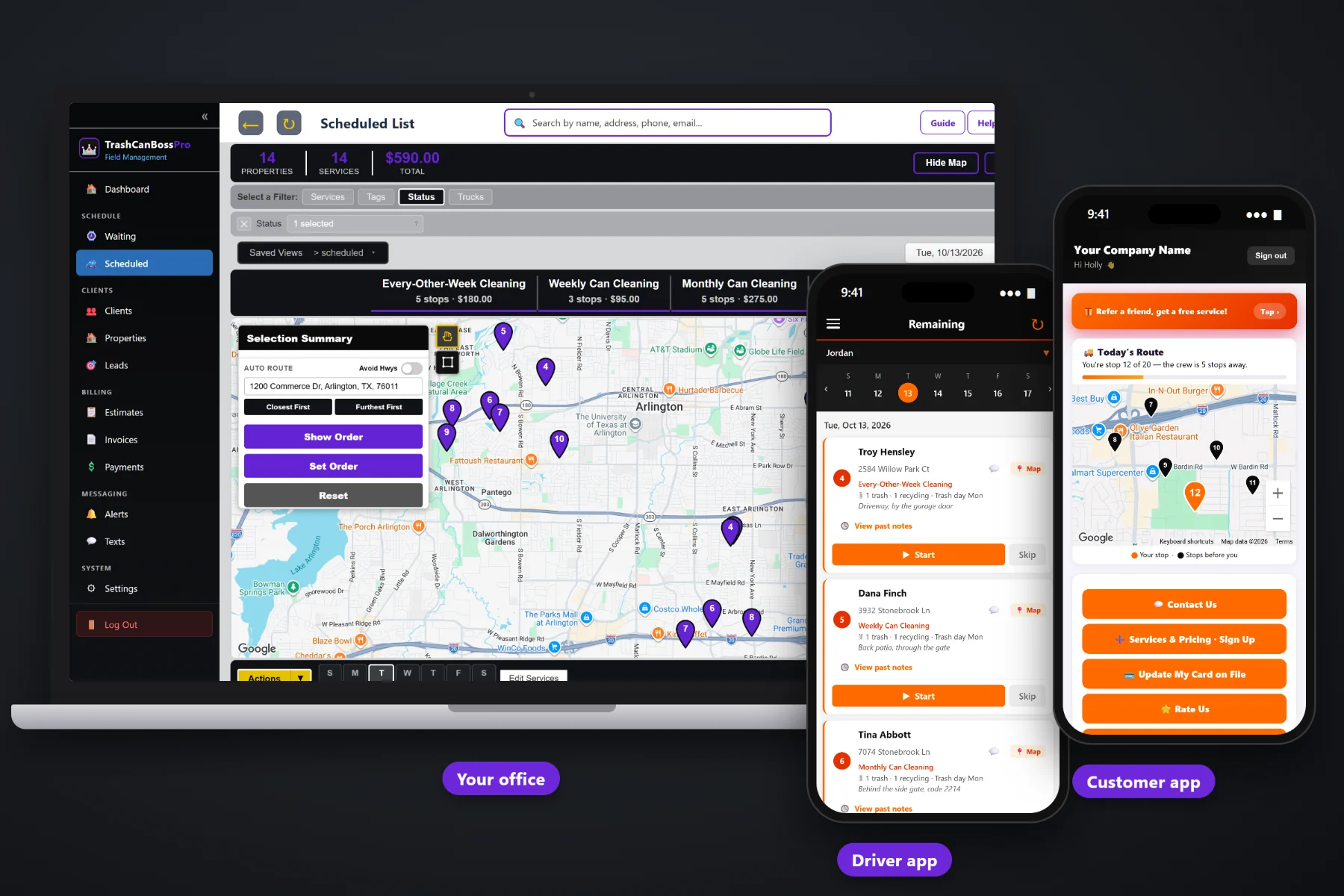
Most bin cleaning customers decide in about the time it takes to walk their cans back up the driveway. If booking means a voicemail, a callback and a text asking for their card number, a lot of them never finish. TrashCanBossPro gives you a website sign-up form that captures the card, a request form for people who want a quote first, Form Responses with one-click convert to client, estimates customers approve online, and a first cleaning scheduled right after the city empties their cans.
Plans start at $59/month and you are never billed per user, so whoever answers the phone, the tech who hands out door hangers and the office manager who converts sign-ups can all log in. The sign-up form, request form, Form Responses, estimates and online approval are part of the platform, not an add-on. To see how booking fits with routes, the tech app and billing, start at TrashCanBossPro and then dig into the sign-up side here.
Customers pick a plan on your website and leave a card at the same time. No callback to ask for the number.
HOAs, landlords and the cautious neighbor can ask for a price first. The request lands in the same place as sign-ups.
Every sign-up and request in one list. One click converts a sign-up into a client with the address and cans filled in.
Build a quote from your service list, send it, and the customer approves it online. Approved work becomes scheduled services.
Trash, recycling and yard waste cans, the city pickup day and the gate code ride with the address from day one.
Happy customers rate and refer from the customer app, so the next sign-up comes from the house next door.
The best moment to learn how many cans a house has and which day the city picks them up is the moment the customer is signing up. TrashCanBossPro keeps those answers with the address, so the first cleaning can be scheduled right after trash day and the tech shows up knowing where the cans live.
Bin cleaning is a neighborhood business. You hang tags, people scan them, and a few of them sign up that night. TrashCanBossPro makes the part after the scan short for the customer and short for you, so new sign-ups land on a route instead of in a pile of texts.
They fill out your website sign-up form with cans, trash day, gate code and plan, and leave a card. Or they send a request for a quote.
Every sign-up and request shows up in one list in the office, with everything the customer typed.
The sign-up becomes a client with the address, cans and trash day attached. Quote requests get an estimate they approve online.
Schedule the first clean for the day after trash pickup, and the plan comes due again on its own after that.
A neighbor sees your trailer, texts the number on the side, and the conversation starts. How many cans? What day is trash? Monthly or one time? What's the address again? Can I get a card? Every one of those messages is a chance for the customer to get busy and never answer.
Ask any bin cleaning owner how booking really works and you will hear the same story: sign-ups scattered across texts, Facebook messages, a notebook in the truck and a spreadsheet at home. A customer who said yes on Tuesday still has no card on file and no first cleaning by Friday. Somebody wrote the gate code on a napkin.
That information belongs on one form that the customer fills out once. When it lands in one place, every sign-up becomes a client with a card and a cleaning date, and nobody has to retype it.
TrashCanBossPro keeps the sign-up, the cans, the trash day and the card together, from the door hanger to the first paid cleaning.
Every tool here exists to turn a curious neighbor into a paying customer with a cleaning on the calendar, with fewer texts and less retyping.
Customers choose a plan and enter their address, cans and trash day on your website.
The card goes on file at sign-up, ready for auto-charge when the first cleaning is completed.
For customers who want a quote before they commit, including HOAs and landlords.
Every sign-up and request in one office list, newest first.
A sign-up becomes a client with the address and can details attached.
Quotes built from your own service list, with line items and sales tax.
Customers approve the estimate online, and approved work becomes scheduled services.
"2 trash · 1 recycling · Trash day Tue" under the address on every list and on the tech's phone.
Side of the garage, behind the gate, code in the notes, all saved with the address.
Weekly, every-other-week and monthly plans come due on the Waiting List on their own.
Welcome texts and booking questions from the office, with replies coming back to the office.
Automated "we clean tomorrow" reminders by text and email before each cleaning.
Customers rate their cleaning and refer neighbors from the customer app.
Existing customers can sign up for more services and see pricing in the customer app.
Tag sign-ups by source or neighborhood, then check which ones stick with reports.
Plans are Start $59, Pro $89, and Crew $199 per month, not a per-seat charge.
A sign-up is only worth something once the cans are clean. Because trash day comes in with the sign-up, you can put the first cleaning on the route that runs right after the city empties that street. From there, weekly, every-other-week and monthly plans come due on the Waiting List on their own, colored not due yet, due now and overdue. The customer gets a leave-the-cans-out reminder, the tech gets the cans and gate code on the job card, and the card on file is charged when the job is completed. For the whole picture, read Bin Cleaning Booking Software: The Complete Guide to Getting Trash Can Cleaning Customers Signed Up.
New customers worry about two things: did the sign-up go through, and when are you coming. Send a welcome text from the office with their first cleaning date, and the automated reminder the night before tells them to leave the cans out. On cleaning day they can watch the route on a live map in the customer app, get on-the-way and arrived alerts if they want them, and see the invoice when the job is done. When they are happy, the same app lets them rate the cleaning and refer the neighbors.
Pick the plan that fits your operation. Every plan starts with a 14-day free trial and no credit card.
Compare plans on the pricing page.
Through the sign-up form on your website. They enter their address, choose a plan and leave a card, and the sign-up lands in Form Responses in the office. One click converts it into a client.
They use the request form instead. The request lands in Form Responses, you build an estimate from your service list, and the customer approves it online. The approved estimate becomes scheduled services.
Each address in TrashCanBossPro holds the number of trash, recycling and yard waste cans, the city trash pickup day and can location notes such as a gate code. Those show under the address on the office lists and on the tech's phone.
The card is captured at sign-up and kept on file. You can charge it automatically when a cleaning is completed or on a schedule, and the customer can update it in the customer app.
Yes. Build an estimate from your service list and send it for online approval. An HOA or property manager set to Monthly billing gets one statement each month covering every address, with each line labeled.
Start is $59/month, Pro is $89/month, and Crew is $199/month. You are never billed per user, and every plan starts with a 14-day free trial with no credit card.
Booking is one piece of how TrashCanBossPro runs a bin cleaning company. For routes built around trash day, the tech app, recurring plans and billing, see the full TrashCanBossPro platform overview.
Practical reading on the sign-up and request forms, what to ask, Form Responses, quotes and online approval, door hangers and neighborhood marketing, referrals, reviews, first cleanings around trash day, seasonal promotions and keeping new customers.
A sign-up form that captures the card, quotes customers approve online, one-click convert to client and first cleanings scheduled around trash day. Try TrashCanBossPro free for 14 days.