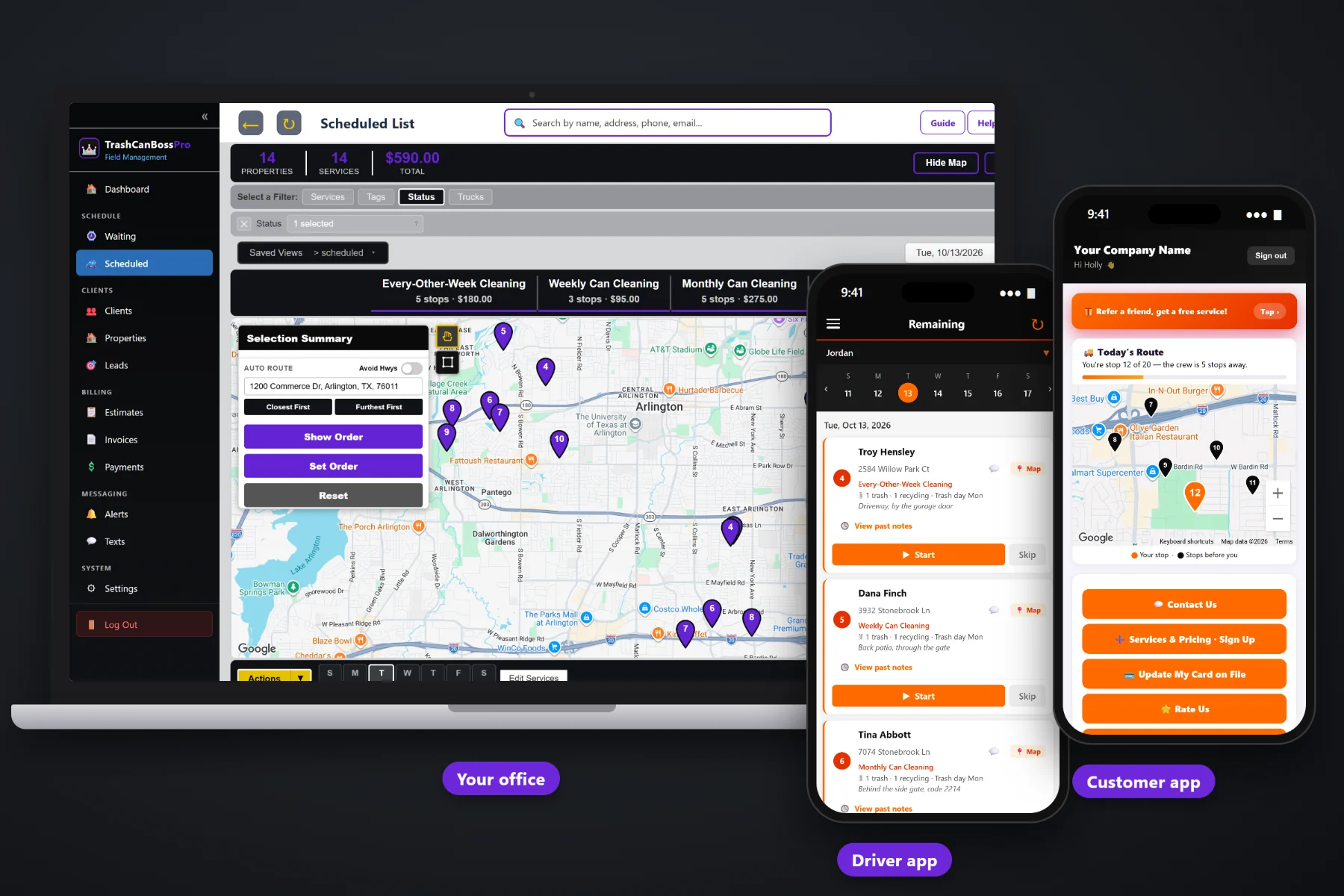
A bin cleaning company lives and dies on three things: knowing how many cans sit at each address, cleaning them right after the city empties them, and getting paid every month without chasing anybody. TrashCanBossPro keeps the cans and trash day on every address, brings weekly, every-other-week and monthly cleanings due on their own, routes the day around trash day, puts the jobs on your tech's phone and charges the card on file when the cans are clean.
Plans start at $59/month and you are never billed per user, so the office, every tech and the weekend helper can all have a login. Cans per address, trash day, recurring plans, routes, the tech app, the customer app, texting and billing come in one platform, not a stack of add-ons. For the full product tour, start at TrashCanBossPro, then use this page and its guides to understand how the whole system fits together.
Trash, recycling and yard waste counts, the city trash day and can location notes, shown under the address everywhere.
Weekly, every-other-week and monthly plans are set by days between visits, so cleanings show up on the Waiting List by themselves.
Group the day by trash day, filter by trailer, auto-route from the shop and set the order your tech will drive.
Jobs in route order, cans and gate codes on each card, before and after photos and Start / Skip / Complete.
"Leave the cans out" reminders, on-the-way and arrived texts, and two-way texting from the office.
The card on file is charged when the job is completed or on a schedule, and HOAs get one monthly statement.
Generic job software stores a name, an address and a notes box. Bin cleaning needs more than that. TrashCanBossPro stores the number of trash, recycling and yard waste cans at each address, the day the city picks up, and where the cans live. That line follows the address onto the office lists, the route and the tech's phone.
Most bin cleaning companies start on a spreadsheet, a notebook and a pile of texts. It works until the second trailer, or the two-hundredth customer. TrashCanBossPro replaces all three with one loop the whole company works from.
The sign-up form on your website captures the address, the plan and the card. One click turns the sign-up into a client.
Weekly, every-other-week or monthly plans come due on the Waiting List map on their own, colored by status.
Assign due cleanings to a trailer and the day after pickup, then auto-route Closest First or Furthest First from the shop.
The tech works the route on the phone, takes before and after photos, taps Complete, and the card on file is charged.
Generic job software assumes a one-off visit at a time the customer picks. Bin cleaning runs the other way: the city sets the day, the cans have to be empty, and the same customer comes due again in a week, two weeks or a month.
Ask any bin cleaning owner how the week really runs and you will hear the same story: a spreadsheet with a column for trash day that nobody trusts, a notebook in the truck with gate codes, and a phone full of texts asking "are you coming today?" Somebody forgot that the house on the corner has three cans now. Somebody else never got charged for March.
That information belongs on the address, not in a notebook or in the owner's head. When it lives in the software, any tech can run any route and the office stops answering the same questions.
TrashCanBossPro keeps the customer, the cans, the plan and the payment in one place, from the first sign-up to the paid invoice.
Every tool here exists to get more cans cleaned on the right day, with fewer missed customers, fewer phone calls and fewer unpaid months.
Trash, recycling and yard waste counts with can location notes, shown as "2 trash · 1 recycling · Trash day Tue."
The city pickup day is stored on the address so routes can follow it.
Weekly, every-other-week and monthly cleanings set by 7, 14 or 28 minimum days between visits.
A live map and list of every cleaning that came due, pinned not due yet, due now or overdue.
Scheduled List by day, filtered by trailer or truck, with Closest First or Furthest First auto-routing.
Company login plus PIN, jobs in route order, navigation, cans on each card, photos, Start / Skip / Complete.
Techs clock in on the same phone, and crew locations show on the office map.
Customers see their place on today's route, request service, update their card and pay invoices.
Text customers from the office, plus automatic reminders and alerts by text and email.
Website sign-up form with card capture, and estimates the customer approves online.
Charge on completion or on a schedule, with past-due follow-up.
One monthly statement for every address an HOA, property manager or business owns.
Tag clients Monthly, Every-Other-Week, HOA or Commercial and add your own fields.
Bring your existing customer list over from a spreadsheet.
Reports for the owner and office user roles for the people answering the phone.
Plans are Start $59, Pro $89 and Crew $199 per month, not a per-seat charge.
A one-trailer startup needs to stop forgetting people and start charging cards automatically. A multi-trailer company needs dispatch by trailer, office roles and crew GPS. TrashCanBossPro does both, so you set it up once and grow into it instead of switching again later. For the full walkthrough of how the pieces fit, read Trash Can Cleaning Software: The Complete Guide for Bin Cleaning Companies.
The most common missed cleaning is a can that went back in the garage. Automatic "we clean tomorrow, leave the cans out" reminders go out by text and email, on-the-way and arrived texts follow as the tech works the route, and the customer app shows a live map with their place in line. When the job is done, the invoice, card on file and online payment are all in the customer app.
Pick the plan that fits your company. Every plan starts with a 14-day free trial and no credit card.
Compare plans on the pricing page.
It is the system a bin cleaning company runs on: customers and addresses with their cans and trash day, recurring plans that come due on their own, routes built around trash day, a phone app for the tech, a customer app, texting and billing with the card on file. TrashCanBossPro does all of that in one place.
No. A one-trailer owner-operator can run the route, the texts and the billing from one phone. Companies with several trailers add techs with their own PIN, filter the dispatch board by trailer and watch crew GPS on the office map.
Each plan has a minimum number of days between visits: 7 for weekly, 14 for every other week, 28 for monthly. When that time has passed, the cleaning shows up on the Waiting List map as due now, and it turns overdue after a 7-day grace.
Yes. Import your customer list from a CSV, then add cans, trash day and plans to each address. Most companies can be running routes within a day.
Yes. Set the account to Monthly and it gets one statement each month covering every address it owns, with each line labeled by address.
Start is $59/month, Pro is $89/month and Crew is $199/month. You are never billed per user, and every plan starts with a 14-day free trial with no credit card.
This page is the overview. For screenshots, the feature list and the live demo, see the full TrashCanBossPro platform overview.
Practical reading on what bin cleaning software does, who it's for, the daily workflow, cans and trash day, recurring plans, routes, the tech and customer apps, texting, billing, HOAs, switching, pricing and choosing the right system.
Cans and trash day on every address, plans that come due on their own, routes by trash day, a tech app and auto-charge. Try TrashCanBossPro free for 14 days.