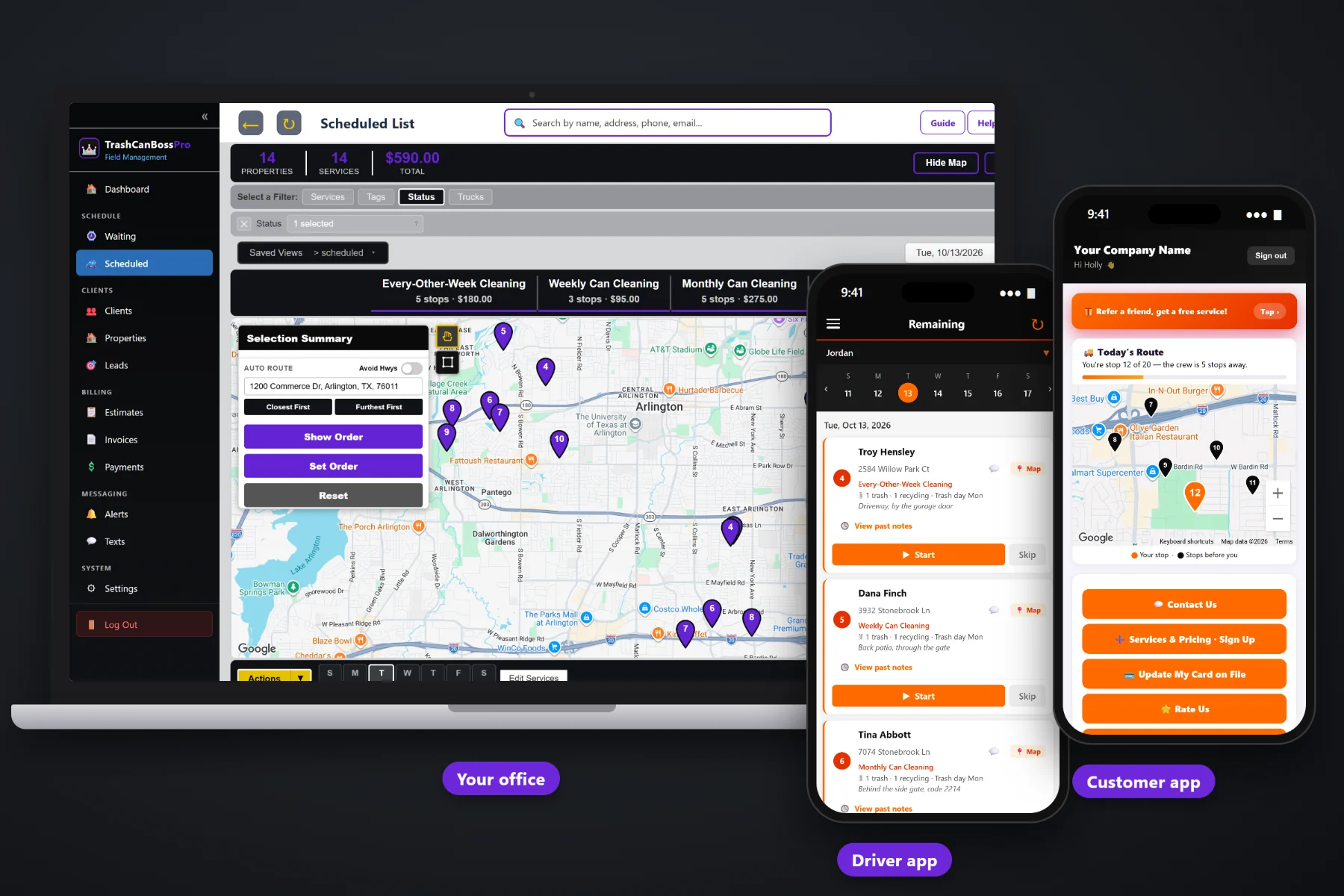
An HOA contract, a property manager with forty rentals or a strip of restaurants behind one shopping center is not one customer with one can. It is one customer with a lot of addresses, a lot of gate codes and one person who wants one bill. TrashCanBossPro keeps every address under one account, puts access notes and can counts on the crew's phone, saves before and after photos as proof, and sends one monthly statement that lists every address it covers.
Plans start at $59/month and you are never billed per user, so the office, the crew leads and the weekend help all get in. Accounts with many addresses, access notes, photos, online quote approval and monthly statements are part of the platform, not an add-on. To see how commercial work fits with recurring plans, the Waiting List, routes and residential billing, start at TrashCanBossPro and then come back here for the account side.
An HOA, a property manager or a restaurant group is one client with every address under it, each with its own cans, trash day and notes.
Gate codes, lockbox spots, key pickups and the site contact show on the crew's job card, right under the address.
Photos taken in the tech app stay with each job, so you can show a board or a manager that every can on the list got cleaned.
Set an account to Monthly and it gets one statement each month covering every address, each line labeled with the address.
Build the estimate from your service list. The manager approves it online and it becomes scheduled services.
Two-way texting from the office, plus automatic reminders and on-the-way and arrived alerts.
Commercial work falls apart when the details live in one person's head. Which corral has the lockbox. Which rental has three cans and which has one. Which restaurant wants the crew gone before the lunch delivery. TrashCanBossPro keeps that on each address, so any crew can run the stop and the manager gets the same service every month.
Commercial accounts are bigger, but the work is the same work you already do: clean the cans after the city empties them, prove it, and get paid. TrashCanBossPro keeps the extra pieces, more addresses, more access notes and one bill, in the same place as the rest of your business.
Build an estimate from your service list. The board or manager approves it online and it becomes scheduled services.
Put every address under the one client, with can counts, trash day, access notes and the site contact. Import a CSV for big lists.
Cleanings come due on the Waiting List. Assign them to a trailer and day around trash day and business hours.
The crew takes before and after photos. At month end the account gets one statement listing every address.
Residential bin cleaning is one house, two cans, one card. Commercial work is one customer with twenty addresses, five gate codes, a key that lives in a lockbox and a treasurer who wants one bill with every address on it. A spreadsheet and a group text can carry a few houses. They cannot carry that.
Ask anyone who has landed a property manager what month two looked like: twenty separate invoices the manager had to match to twenty addresses, a crew standing at a locked corral, and a board member asking how they know the cans were actually cleaned.
The fix is not working harder. It is keeping every address under the account, the way in on the crew's phone, the photos on the job and one statement at the end of the month.
TrashCanBossPro holds the account, the addresses, the cans and the billing in one place, from the approved quote to the paid statement.
Every tool here exists to win the bigger account, serve every address on it the same way each time, and send a bill the manager can pay without calling you.
One HOA, property manager or business holds every address it owns, and you add more as the account grows.
Trash, recycling and yard waste counts plus the city trash day, shown as "2 trash · 1 recycling · Trash day Tue".
Gate codes, lockboxes, key pickups and can locations on each address, shown on the crew's phone.
Tag accounts HOA or Commercial, and add your own fields for things like board contact or contract renewal month.
Estimates built from your service list. Approved estimates become scheduled services.
Weekly, every-other-week and monthly cleanings come due on their own on the Waiting List.
Filter the dispatch board by trailer or truck, auto-route Closest First or Furthest First, and set the order.
Taken in the tech app and saved with the job, ready when a board or manager asks.
One statement per month for an account set to Monthly, each line labeled with its address.
Charge a card on file on a schedule, or send the statement and record the check. Your policy, per account.
Text property managers and site contacts from the office. Replies come back to the office.
Automatic night-before reminders and on-the-way and arrived alerts by text and email.
See what you have billed and collected, so you know which accounts carry their weight.
Bring in an HOA's or manager's address list instead of typing it address by address.
Route order, navigation, cans, notes, Start / Skip / Complete and photos on iPhone and Android.
Plans are Start $59, Pro $89 and Crew $199 per month, not a per-seat charge.
An HOA's cans come due on the Waiting List just like a homeowner's, colored not due yet, due now or overdue. The office drops them on a trailer and a day, builds the route around the neighborhood's trash day, and slots restaurants and retail pads before they open or after the rush. The crew sees each address with its cans and access notes, and tapping Complete puts the job on the account's monthly statement. For the whole picture, read HOA and Commercial Bin Cleaning: The Complete Guide to Winning, Serving and Billing Accounts With Many Addresses.
A board treasurer or a property manager does not want twenty invoices. Set the account to Monthly and TrashCanBossPro sends one statement each month that covers every address the account owns, each line labeled with its address. Charge a card on file on a schedule or take a check; that is your call per account. Past-due follow-up runs on its own, and the manager can see invoices and pay online in the customer app.
Pick the plan that fits your operation. Every plan starts with a 14-day free trial and no credit card.
Compare plans on the pricing page.
Yes. An HOA, property manager, apartment owner or restaurant group is one client with every address under it. Each address keeps its own can counts, city trash day, can location and access notes, and you can add addresses as the account grows.
One. Set the account to Monthly and it gets one statement each month covering every address it owns, with each line labeled by address, so the manager can see exactly which rental was cleaned.
No. Card on file with a scheduled charge works well for many accounts, and some boards and managers will only pay by check against a statement. You set the policy per account.
On the address. They show under the address on the office lists and on the crew's phone, along with the can location and the cans to clean, so the crew is not calling the office from a locked corral.
The crew takes before and after photos in the tech app, and they stay with each job. When a board member or manager asks, you pull up the photos for that address and date.
Start is $59/month, Pro is $89/month and Crew is $199/month. You are never billed per user, and every plan starts with a 14-day free trial with no credit card.
HOA and commercial accounts are one piece of how TrashCanBossPro runs a bin cleaning company. For residential subscriptions, the Waiting List, routes, the tech app and billing, see the full TrashCanBossPro platform overview.
Practical reading on winning HOA contracts, property managers, apartments, restaurants and dumpster pads, access notes, monthly statements, photos as proof, quoting, texting with managers and keeping accounts renewing.
Many addresses under one account, access notes on the crew's phone, before and after photos and one monthly statement. Try TrashCanBossPro free for 14 days.