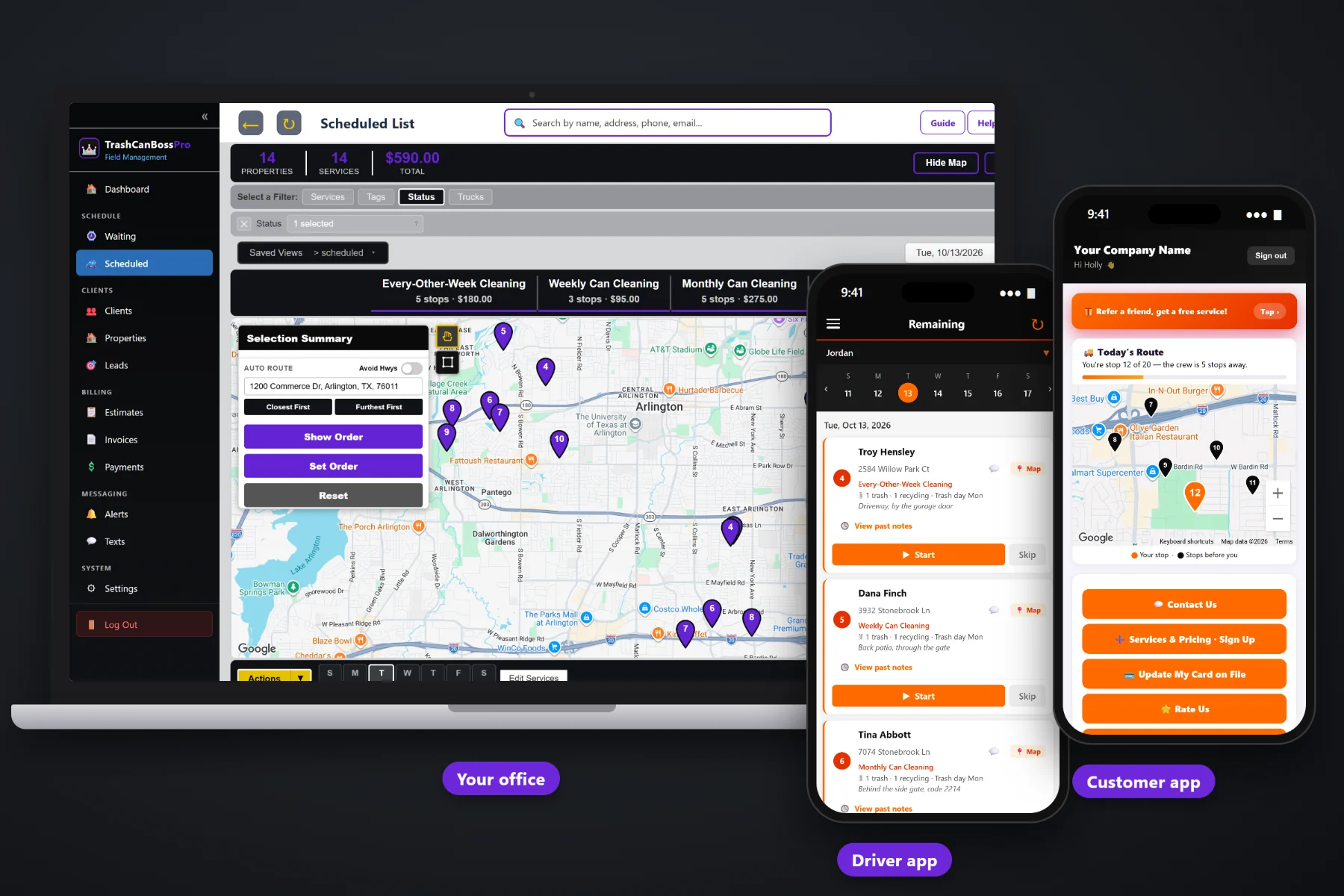
Cleaning a can takes a few minutes. Running a bin cleaning company takes a lot more: plans that come due every week, routes that follow the city's trash days, techs who need the day on their phone, cards that need charging and customers who want to know when you're coming. TrashCanBossPro keeps all of it in one place, so the business keeps running when you're on the trailer, in the truck or finally taking a day off.
Plans start at $59/month and you are never billed per user, so the owner, the office and every tech on every trailer can log in. Recurring plans, routes, the tech app, customer texts, billing and reports are part of the platform, not add-ons. For the full tour of what the software does, start at TrashCanBossPro. This page is about the business side: starting, pricing, hiring, growing and keeping the money you earn.
Weekly, every-other-week and monthly cleanings come due on their own, so no customer falls through the cracks when you get busy.
Build each day around the city's pickup schedule and clean cans right after they are emptied.
Any tech can run any route: cans, can location, gate codes and notes are on the phone, not in your head.
Complete creates the invoice and can charge the card on file. Past-due follow-up keeps the money coming in.
See what got cleaned, what got skipped, what got paid and what is still owed, without building a spreadsheet.
Office user roles, employee PINs and trailer assignments for the day you stop doing it all yourself.
Most bin cleaning owners run the business from memory and a notebook in the truck. That works for the first fifty customers. After that, things slip: a monthly customer nobody cleaned, a declined card nobody chased, an extra can nobody billed. TrashCanBossPro puts the numbers that matter in front of you, so a quick look tells you what needs attention this week.
You don't need a consultant or a week of setup. Bring your customer list, your service prices and your trailer, and TrashCanBossPro is ready for your first route. It runs in the browser on a computer, an iPhone or an Android phone.
Bring in your existing list by CSV, or add customers one at a time. Each address gets its cans, its trash day and its can location notes.
Weekly, every-other-week, monthly and one-time cleanings with your own prices, so estimates and sign-ups use the same list.
Set up employees with a personal PIN and assign them to a trailer or truck. You are never billed per user.
Cleanings come due on the Waiting List. Assign them to a day, auto-route from the shop, and the tech works the list on their phone.
A bin cleaning business is a subscription business with a route attached. Every customer is a promise to show up on a schedule, the day after the city empties the cans, and to bill for it. Generic field-service software treats every job as a one-off. Spreadsheets and paper don't remind you of anything.
Ask an owner who grew past their first trailer what went wrong and you will hear the same story: a spreadsheet of customers that was never quite current, a notebook of who pays by card, and a phone full of texts asking "are you coming this week?" Every new customer added a little more to remember, and eventually something got forgotten.
The fix is not working harder. It is putting the schedule, the cans, the route and the billing in one system, so the business remembers for you and anyone you hire can pick up where you left off.
TrashCanBossPro was built for that: the customer, the address, the cans, the plan, the route and the invoice, from sign-up to paid.
Every tool here exists to keep plans on schedule, routes tight, techs on track and money coming in, whether you run one trailer or several.
Trash, recycling and yard waste cans, the city trash day and can location notes, shown on the lists and the tech's phone.
Weekly, every-other-week and monthly cleanings set by minimum days between visits, so they come due on their own.
Every cleaning that came due on a live map, with pins for not due yet, due now and overdue.
Scheduled List by day, filter by trailer or truck, auto-route Closest First or Furthest First from the shop.
Company login and PIN, jobs in route order, navigation, cans on each card, Start / Skip / Complete, photos and a time clock.
Crew locations from the techs' phones on the office map during the workday.
Website request and sign-up forms with card captured land in Form Responses. One click makes them a client.
Text customers from the office, plus automated reminders and on-the-way and arrived alerts.
Line items and sales tax, auto-charge on completion or on a schedule, and online payment from the customer app.
Declined cards and unpaid invoices are easy to find and follow up, instead of slipping for months.
An HOA, property manager or business gets one statement each month with every address listed.
Tag clients Monthly, Every-Other-Week, HOA or Commercial and add the fields your business tracks.
Cleanings, invoices and payments, so the weekly numbers are a few clicks away.
Owner, Manager, Office, Crew Lead and Mobile roles, each with the right level of access.
Works in the US, Canada, Australia, New Zealand and the UK, and bills customers in their own currency.
Plans are Start $59, Pro $89 and Crew $199 per month. Add techs and office help without a per-seat charge.
The software you start with should still fit when you add a second trailer, hire your first tech or bring on office help. In TrashCanBossPro, a new trailer is a filter on the dispatch board, a new tech is an employee with a PIN, and a new office person is a user with a role. The plans, the cans, the routes and the billing stay where they were. For the full walkthrough of running the business on one system, read Trash Can Cleaning Business Software: The Complete Guide to Running a Bin Cleaning Company.
Bin cleaning customers rarely see you work. The cans are at the curb, the trailer comes and goes, and the only proof is a clean can. That is why communication keeps subscriptions alive. TrashCanBossPro sends the night-before reminder to leave the cans out, the on-the-way and arrived texts, and gives customers an app with their invoices, their card, a live map of the route and a way to rate and refer you.
Pick the plan that fits where your business is today and move up when it grows. Every plan starts with a 14-day free trial and no credit card.
Compare plans on the pricing page.
Yes, if you plan to grow. Setting up customers, cans, trash days and plans correctly from the start is far easier than cleaning up a messy spreadsheet later. Start is $59/month, and the 14-day free trial needs no credit card, so you can set up your first routes before you pay anything.
Yes. Import your customers from a CSV file, then add each address's cans, trash day and can location notes. Plans can be set up as weekly, every-other-week or monthly so they come due on their own.
The Waiting List shows every cleaning that came due on a live map and list. Pins are colored not due yet, due now and overdue past a 7-day grace, so nobody gets forgotten when the season gets busy.
Add them as an employee with a personal PIN and assign them to a trailer. They log in on their own phone with your company login and their PIN, see their jobs in route order and clock in and out. You are never billed per user.
Yes. Office user roles let you give office help access to the parts of the business they handle, from texting customers to building routes, while you keep owner-level access.
Start is $59/month, Pro is $89/month, and Crew is $199/month. You are never billed per user, and every plan starts with a 14-day free trial with no credit card.
Running the business is one side of TrashCanBossPro. For cans on every address, routes by trash day, the tech app, the customer app and billing, see the full TrashCanBossPro platform overview.
Practical reading on starting out, choosing software, pricing your plans, route density, adding trailers, hiring and training, seasons, marketing, reports, profit leaks, office help and growing the company.
Recurring plans, routes by trash day, a tech app, card-on-file billing, reports and office roles in one place. Try TrashCanBossPro free for 14 days.